

Link your RPH Membership to your Discord
Having a games booking system on our website and a separate community on our public Discord server often causes confusion and dismay because we can't match up names. People tend to use real names when they sign-up for games on the website, but they often use quite different quirky names on Discord. It can be impossible to trace and include players in Discord updates. B Baggins may be Mr_Underhill!
But we think we have cracked it! (Well Nikita has. Thank you Nikita.)
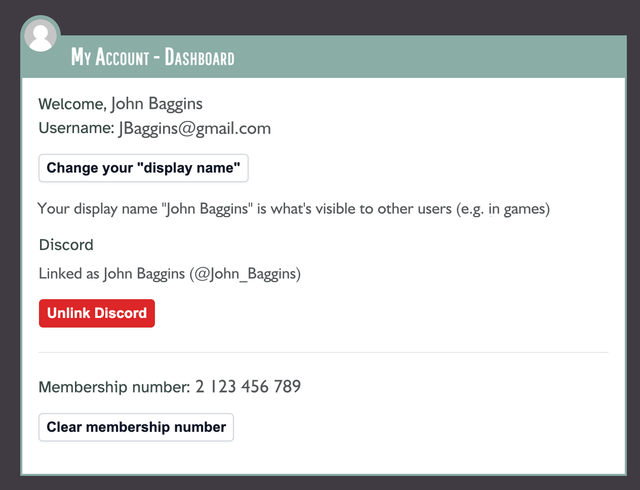
You can now log in to your "My Account" on the website and click the "Link Discord" button. You'll be taken to the Discord website where you'll be asked to authorise our website to see your basic Discord details (user name and ID). This is just to confirm that you own that Discord account – Role Play Haven won't be able to access your Discord email address or any other information that Discord holds.
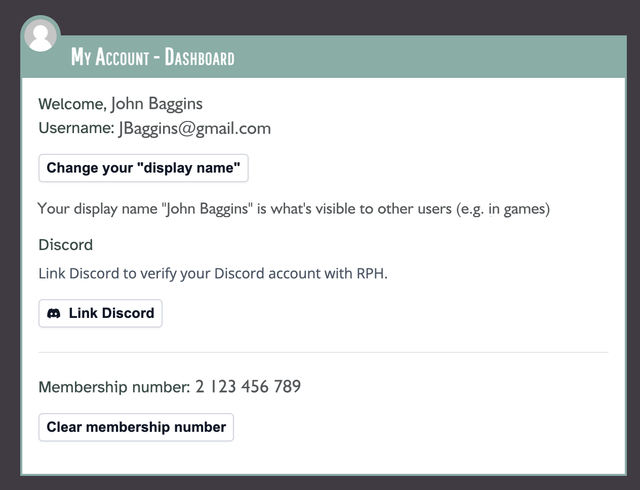
When you are successful, the button will change to a red button reading "Unlink Discord", just incase you change your mind for any reason.
Of course this isn't mandatory, you don't have to use Discord to play at RPH, and you're welcome to continue to use the website without linking your Discord account. But if you are on our Discord server then it will make things a lot smoother in future. For example, soon GMs will be able to see the Discord user names of the players in their game so you can reach out to them directly on Discord. In future, we also aim to automate creation of games channels, sending out game status reminders to GMs, and more.